Designing a Rate Limiter: Concepts, Algorithms, and System Design
A comprehensive guide to understanding rate limiting, its concepts, algorithms, and system design for building scalable APIs.
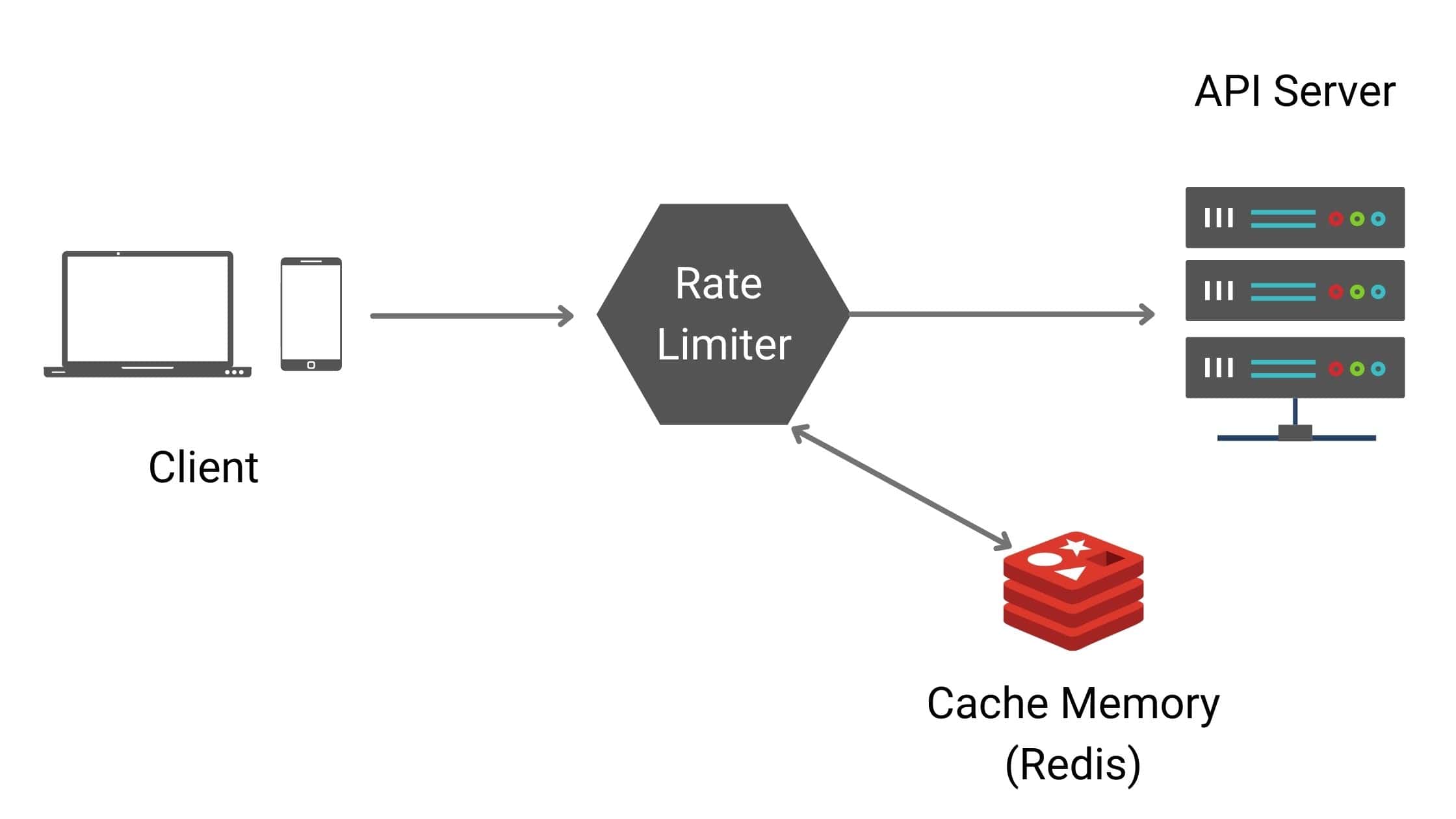 Rate Limiter
In modern network systems, rate limiting plays a crucial role in ensuring system stability and security. At its core, a rate limiter controls the amount of traffic sent by a client or service within a defined span of time.
In simpler terms, it defines how many requests a client is allowed to send to a server or API within a given timeframe. If the number of requests exceeds the defined threshold, further requests are either blocked, delayed, or dropped.
Simple Examples#
- A user can't post more than 2 posts within 3 seconds.
- A user can't create more than 10 accounts in a day.
This mechanism protects systems from resource starvation caused by unintentional overuse or malicious attacks such as Distributed Denial of Service (DDoS). Almost every large-scale company — Google, Facebook, Twitter, Stripe, Amazon — employs some form of rate limiting to ensure their infrastructure is safe, reliable, and cost-effective.
Key Requirements for a Good Rate Limiter#
An effective rate limiter should:
- Accurately enforce limits on excessive requests.
- Add minimal latency, so it doesn't slow down HTTP response times.
- Consume little memory for scalability.
- Work across distributed systems, supporting multiple servers and processes.
- Provide clear feedback to users via meaningful exceptions (e.g., HTTP 429 Too Many Requests).
Where to Place a Rate Limiter#
Rate limiting can be implemented on both the client side and the server side. However, server-side rate limiting is more reliable because client-side checks can be easily bypassed by malicious actors.
Rate Limiter as Middleware#
In most real-world systems, rate limiters are placed:
- As middleware — throttles requests before reaching APIs.
- Inside an API Gateway — which often provides additional features like authentication, SSL termination, IP whitelisting, and static content delivery.
But there is no absolute answer whether the rate limiter should be at server side or as middleware. It all depends on the technology stack, engineering resources, and priorities.
Ultimately, the choice depends on architecture and priorities:
- In monolithic setups, middleware might be sufficient.
- In microservices architectures, API gateways are the preferred choice since they already centralize traffic management.
Rate Limiter Blocking Requests:
Popular Algorithms for Rate Limiting#
There is no one-size-fits-all algorithm. Each approach has trade-offs depending on accuracy, memory usage, and tolerance for burst traffic. Let's look at the most widely used ones.
1. Token Bucket Algorithm#
Widely used by companies like Amazon and Stripe, the Token Bucket algorithm is one of the most popular approaches.
How it works:
- A bucket holds tokens.
- A refiller adds tokens at a fixed rate (e.g., 3 tokens per second).
- Each incoming request consumes one token.
- If no tokens are available, requests are dropped until tokens are replenished.
- Extra tokens are discarded if the bucket is full.
Parameters:
- Bucket size — maximum number of tokens.
- Refill rate — how many tokens are added per time unit.
Use Cases:
- Per-user, per-endpoint, or per-IP throttling.
- Global system-wide rate limits.
| Pros | Cons |
|---|---|
| Easy to implement | Requires careful tuning of bucket size and refill rate |
| Memory efficient | |
| Allows short bursts of traffic |
2. Leaking Bucket Algorithm#
Similar to the token bucket but with fixed-rate request processing. It is typically implemented with a queue.
How it works:
- Requests enter the queue.
- If the queue is full, requests are dropped.
- Requests exit at a fixed rate regardless of bursts.
Parameters:
- Bucket size (queue length).
- Outflow rate (requests/sec).
Use Cases:
- Systems requiring stable, predictable request processing.
- Shopify uses this approach.
| Pros | Cons |
|---|---|
| Memory efficient | Bursts can clog the queue with old requests |
| Smooths out traffic spikes | Newer requests may get unfairly dropped |
3. Fixed Window Counter#
In this algorithm the timeline is divided into fixed-sized time windows, and a counter is assigned to each window. Each request increments the counter by one. Once the counter reaches the pre-defined threshold, further requests are dropped until a new time window starts.
How it works:
Within a certain time of 1 second, if we have a threshold of only 3, it will process only 3 requests and will block further ones until the time window resets.
Legend: Teal = Accepted (within threshold) | Gray dashed = Dropped (exceeded threshold of 3)
The Edge Case Problem:
Consider a threshold of 5 requests within a minute. Looking at time windows between 2:00:00–2:01:00 and 2:01:00–2:02:00, we have 5 requests in each bucket. But when we consider the window from 2:00:30 to 2:01:30, we have 10 requests within a minute — which exceeds our threshold.
This shows how 5 requests at 2:00:30 and 5 requests at 2:01:30 can bypass the threshold when viewed across a sliding window.
| Pros | Cons |
|---|---|
| Simple and memory efficient | Prone to edge spikes |
| Works well for certain time-based use cases | A client can send 5 requests at 2:00:59 and 5 at 2:01:01, effectively 10 requests in 2 seconds |
4. Sliding Window Log#
A more accurate solution that eliminates the spike problem.
How it works:
- The algorithm keeps track of request timestamps (usually kept in cache).
- When a new request comes in, remove all outdated timestamps (those older than the start of the current time window).
- Add timestamp of the new request to the log.
- If the log size is same or lower than the threshold, the request is accepted; else rejected.
Example with 2 requests per minute limit:
- The log is empty when a new request arrives at 1:00:01 — request is allowed.
- A new request arrives at 1:00:30, timestamp is inserted. Log size is 2 (threshold).
- A request arrives at 1:00:50 — log size becomes 3 (exceeds threshold), request is discarded.
- A new request arrives at 1:01:40. Requests before 1:00:40 are outdated and removed. Log size becomes 2, request is accepted.
Note: At 1:01:40, timestamps 1:00:01 and 1:00:30 are removed as they're outside the sliding window.
| Pros | Cons |
|---|---|
| Very accurate for rolling windows | High memory usage since every timestamp must be stored |
5. Sliding Window Counter#
A hybrid between Fixed Window and Sliding Log.
How it works:
Assuming the rate limiter allows a maximum of 7 requests per minute and we have 3 in the current minute:
- Current window: 30% of time elapsed
- Previous window: 70% overlap with rolling window
Calculation:
Requests in rolling window = Current window requests + (Previous window requests × overlap percentage)
= 3 + (5 × 0.7) = 6.5 ≈ 6 or 7
Calculation: 5 × 70% + 3 = 3.5 + 3 = 6.5 requests (rounded to 6 or 7)
Since the rate limiter allows 7 requests per minute, the current request can go through.
| Pros | Cons |
|---|---|
| Balanced accuracy and memory efficiency | Less precise than sliding log |
| Not suitable for ultra-strict limits |
High-Level Architecture#
The basic idea is simple: we need a counter to keep track of how many requests are sent from the same user or IP address. If the counter exceeds the limit, the request is discarded.
Why not use a database?
Databases are too slow due to disk access. An in-memory cache is chosen because it's fast and supports time-based expiration. Redis is a popular option offering:
INCR— Increases the stored counter by 1.EXPIRE— Sets a timeout for the counter; if expired, the counter is automatically deleted.
Request Flow:
- Client sends a request to rate limiting middleware.
- Middleware fetches the counter value from Redis.
- Checks if the limit is reached.
- If limit reached → request rejected; else → forwarded to API servers.
- Counter is incremented and saved back to Redis.
Defining Rules#
Rate limits are often defined in configuration files. Example using Lyft's open-source rate limiting component:
domain: messaging
descriptors:
  - key: message_type
    value: sales
    rate_limit:
      unit: day
      requests_per_unit: 5
This allows a maximum of 5 sales messages per day.
domain: auth
descriptors:
  - key: auth_type
    value: login
    rate_limit:
      unit: minute
      requests_per_unit: 5
This prevents more than 5 login attempts within a minute.
Rate Limiter Headers#
How does a client know that the request is being throttled? The answer lies in HTTP headers:
| Header | Description |
|---|---|
X-Ratelimit-Remaining | Remaining allowed requests within the window |
X-Ratelimit-Limit | Total calls allowed per time window |
X-Ratelimit-Retry-After | Seconds to wait before making another request |
When a user has sent too many requests, a 429 (Too Many Requests) error and X-Ratelimit-Retry-After header are returned.
Detailed Design#
- Rules are stored on disk.
- Workers frequently pull rules from disk and store them in cache.
- Client sends a request to the rate limiter middleware.
- Middleware loads rules from cache and fetches counters/timestamps from Redis.
- Decision:
- If not rate limited → forward to API server.
- If rate limited → return 429 error; optionally queue the request for later processing.
Rate Limiter in Distributed Systems#
Building a rate limiter for a single server is straightforward. Scaling to multiple servers introduces challenges:
1. Race Condition#
The Problem:
- Read the counter value from Redis.
- Check if (counter + 1) exceeds the threshold.
- If not, increment the counter by 1.
If two requests concurrently read the counter (value: 3) before either writes back, both will increment to 4. But the counter should be 5.
Solutions:
- Locks — Obvious but slow.
- Lua Scripts — Atomic operations in Redis.
- Sorted Sets — Redis data structure for atomic updates.
2. Synchronization Across Servers#
With millions of users, one rate limiter isn't enough. When multiple rate limiters are used, synchronization is required.
The Problem:
- Client 1 sends requests to Rate Limiter 1.
- Client 2 sends requests to Rate Limiter 2.
- Since the web tier is stateless, clients can hit different rate limiters.
- Without synchronization, Rate Limiter 1 has no data about Client 2.
Solutions:
- Sticky Sessions — Route client to same rate limiter. Not scalable or flexible.
- Centralized Data Store (Redis) — Better approach. All rate limiters read/write from the same Redis cluster.
With centralized Redis, both rate limiters share the same data store, ensuring accurate request counts regardless of which rate limiter handles the request.
Monitoring and Analytics#
Once deployed, monitoring the rate limiter is critical:
- Ensure rules are not too strict (dropping valid requests).
- Detect cases where limits are too lenient (letting abuse slip through).
- Adjust algorithms based on use cases:
- Token Bucket for burst traffic (e.g., flash sales).
- Leaking Bucket for stable processing rates.
Algorithm Comparison#
| Algorithm | Memory | Accuracy | Burst Handling |
|---|---|---|---|
| Token Bucket | Low | Good | Allows bursts |
| Leaking Bucket | Low | Good | Smooths traffic |
| Fixed Window | Low | Poor at edges | Edge spikes |
| Sliding Window Log | High | Excellent | Accurate |
| Sliding Window Counter | Medium | Good | Balanced |
Conclusion#
At the end of the day, a rate limiter isn't just a technical safeguard — it's a way of making your system fair, reliable, and resilient. The right design ensures your APIs stay fast, your servers stay healthy, and your users stay happy.
A well-designed rate limiter is like a quiet hero — unnoticed when everything runs smoothly, but absolutely vital when things go wrong.
More Posts
The Evolution of HTTP: From Plain Text to Lightning-Fast QUIC
A journey through the history of HTTP and the rise of QUIC, the next-generation protocol that promises to revolutionize the way we access the web.
Tech Behind the Scenes: Mastering Software Architecture Patterns
A comprehensive guide to understanding software architecture patterns from monolithic to microservices and beyond.